I didn't know that there is a keyboard shortcut in GMail until today. This is by accidentally, I press the "?" or "Shift + /".
;-)
Showing posts with label GMail. Show all posts
Showing posts with label GMail. Show all posts
Jul 13, 2011
Feb 1, 2011
10 Advanced GMail Search Examples
Tags:
GMail
1. Example: in:inbox label:facebook is:unread
Read more: Gmail Advanced Search - Ultimate Guide http://www.hongkiat.com/blog/gmail-advanced-search-ultimate-guide/
(Search for all unread emails labeled facebook inside inbox.)2. Example: in:anywhere from:peter
(Search for all emails regardless where it’s stored (spam, inbox, trash) received from anyone with the name Peter.)3. Example: is:unread after:2010/06/01 before:2010/07/01
(Search for all unread mails for the month of June. )4. Example: from: peter@emailadress.com has:attachment
(Return all emails with attachments sent by peter@emailadress.com)5. Example: in:inbox "meeting"
(Search inbox for any emails with the keyword "meeting" in it.)6. Example: from:peter@emailaddress.com has:attachment filename:zip
(Return only emails received from peter@emailaddress.com with .zip attachments.)7. Example: "facebook" -from:@facebookmail.com
(Return all emails with the keyword "facebook", excluding those sent by facebook.com)8. Example: to:peter OR cc:peter
(Return all emails sent to or carbon copied Peter.)9. Example: label:google OR from:@google.com
(Return all emails received from google.com or labeled "google".)10. Example: "meeting" is:chat
(Return all chat log files with keyword "meeting" in it.)
Read more: Gmail Advanced Search - Ultimate Guide http://www.hongkiat.com/blog/gmail-advanced-search-ultimate-guide/
Jul 19, 2010
SHVA=1
Tags:
GMail
According to Mike Sego, a former Gmail engineer, "shva" is an acronym for "should have valid authentication". Apparently, the parameter is only included after a successful authentication.
Jun 26, 2009
Google's approach to email
Tags:
GMail
Become a Gmail Ninja: white belt, green belt, black belt, and Master.
Learn tips and tricks to save time, increase your productivity, and manage your email efficiently. Start with the tips that are right for you, based on how much email you get each day.
Learn tips and tricks to save time, increase your productivity, and manage your email efficiently. Start with the tips that are right for you, based on how much email you get each day.
Oct 31, 2008
Gmail Modes
Tags:
GMail
>>>> From Google Operating System
If you can't access Gmail, try some of these URLs:
Safe mode - http://mail.google.com/mail/?labs=0. It disables the experimental features from Gmail Labs, just in case some of them are buggy. You can remove some of the features from Gmail's settings page.
Secure mode - https://mail.google.com/. It encrypts the traffic between your computer and Gmail's servers. Use it from public computers, Wi-Fi networks or to bypass some proxies and web accelerators. There's a Gmail setting that redirects the standard version to the secure mode ("Always use https").
Older version - http://mail.google.com/mail/?ui=1. This version has been replaced in October 2007 by a rearchitectured Gmail, but the old version is a little bit faster.
Basic mode - http://mail.google.com/mail/?ui=html. It's the version that doesn't use JavaScript, so it loads faster and it works well with older browsers. Unfortunately, many Gmail features are missing (contacts autocomplete, chat, spell checker, rich formatting) and each click loads a new page. If you like this version, click on "Set basic HTML as default view" at the top of the page.
Mobile mode - http://mail.google.com/mail/?ui=mobile or http://m.gmail.com. This is a simplified Gmail interface for mobile phones that has even less feature than the basic mode. Use it if no other Gmail mode works for you.
iPhone mode - http://mail.google.com/mail/x/gdlakb-/gp/. A more user-friendly mobile version for iPhone and other mobile phones that use WebKit-based browsers.
iGoogle gadget - http://www.google.com/ig/gmailmax. This was mentioned here before. It is a canvas view for the updated Gmail gadget which can be found in the new iGoogle. Some people found that this interface bypasses most corporate filters that prevent them from accessing Gmail at work.
"No browser checking" mode - http://mail.google.com/mail?nocheckbrowser. If you use a cutting-edge new browser and Gmail serves you the basic HTML mode, try this URL to bypass browser detection.
Command Line mode - http://goosh.org/. This is for UNIX users.
If you can't access Gmail, try some of these URLs:
Safe mode - http://mail.google.com/mail/?labs=0. It disables the experimental features from Gmail Labs, just in case some of them are buggy. You can remove some of the features from Gmail's settings page.
Secure mode - https://mail.google.com/. It encrypts the traffic between your computer and Gmail's servers. Use it from public computers, Wi-Fi networks or to bypass some proxies and web accelerators. There's a Gmail setting that redirects the standard version to the secure mode ("Always use https").
Older version - http://mail.google.com/mail/?ui=1. This version has been replaced in October 2007 by a rearchitectured Gmail, but the old version is a little bit faster.
Basic mode - http://mail.google.com/mail/?ui=html. It's the version that doesn't use JavaScript, so it loads faster and it works well with older browsers. Unfortunately, many Gmail features are missing (contacts autocomplete, chat, spell checker, rich formatting) and each click loads a new page. If you like this version, click on "Set basic HTML as default view" at the top of the page.
Mobile mode - http://mail.google.com/mail/?ui=mobile or http://m.gmail.com. This is a simplified Gmail interface for mobile phones that has even less feature than the basic mode. Use it if no other Gmail mode works for you.
iPhone mode - http://mail.google.com/mail/x/gdlakb-/gp/. A more user-friendly mobile version for iPhone and other mobile phones that use WebKit-based browsers.
iGoogle gadget - http://www.google.com/ig/gmailmax. This was mentioned here before. It is a canvas view for the updated Gmail gadget which can be found in the new iGoogle. Some people found that this interface bypasses most corporate filters that prevent them from accessing Gmail at work.
"No browser checking" mode - http://mail.google.com/mail?nocheckbrowser. If you use a cutting-edge new browser and Gmail serves you the basic HTML mode, try this URL to bypass browser detection.
Command Line mode - http://goosh.org/. This is for UNIX users.
Sep 27, 2008
The Best Gmail Error Message
Tags:
GMail
>>>> Google Operating System
You can't get a funnier error message than this:
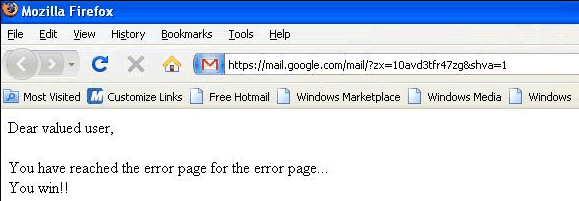
Sometimes even the error pages can't be displayed and you need to come up with a plan B. Gmail's meta-error page is simple, yet effective: Google can't always win.
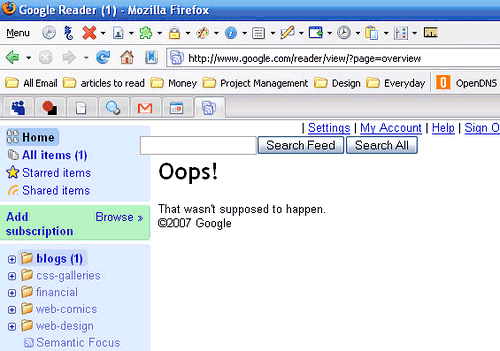
This reminds me of a similar error message from Google Reader: "Oops! That wasn't supposed to happen".
{ The first screenshot is licensed as Creative Commons Attribution-Noncommercial by Viofiddler. The second one is licensed as Creative Commons Attribution by Ashley Dryden. }
via Google Operating System by Alex Chitu on 9/25/08
You can't get a funnier error message than this:
Dear valued user,
You have reached the error page for the error page...
You win!!
Sometimes even the error pages can't be displayed and you need to come up with a plan B. Gmail's meta-error page is simple, yet effective: Google can't always win.
This reminds me of a similar error message from Google Reader: "Oops! That wasn't supposed to happen".
{ The first screenshot is licensed as Creative Commons Attribution-Noncommercial by Viofiddler. The second one is licensed as Creative Commons Attribution by Ashley Dryden. }
Jul 22, 2008
Access GMail with Google Sandbox
 Below is the steps to bypass proxy blocking to access GMail. You must be able to login to iGoogle at least.
- Sign in to iGoogle with your Google account.
- Sign up for iGoogle sandbox service from here.
- Add the Gmail gadget.
- If you still can't access at this stage (because your proxy may block any url that contains the word gmail), then try https://www.google.com/ig/gmailmax
Subscribe to:
Posts (Atom)