Showing posts with label mis-configuration. Show all posts

Aug 11, 2022

Cyber Attack on Cisco

The threat actors manage to gain access to corporate network even the VPN is protected with MFA. And 2.75GB of data are stolen from Cisco.

IMO, using push notification MFA can be insecure if it is mis-configured. Same for any 2FA or MFA, a mis-configured security controls is just a false sense of security. 

Here is the initial vector from Cisco Talos.

Initial access to the Cisco VPN was achieved via the successful compromise of a Cisco employee’s personal Google account. The user had enabled password syncing via Google Chrome and had stored their Cisco credentials in their browser, enabling that information to synchronize to their Google account. After obtaining the user’s credentials, the attacker attempted to bypass multifactor authentication (MFA) using a variety of techniques, including voice phishing (aka "vishing") and MFA fatigue, the process of sending a high volume of push requests to the target’s mobile device until the user accepts, either accidentally or simply to attempt to silence the repeated push notifications they are receiving. Vishing is an increasingly common social engineering technique whereby attackers try to trick employees into divulging sensitive information over the phone. In this instance, an employee reported that they received multiple calls over several days in which the callers – who spoke in English with various international accents and dialects – purported to be associated with support organizations trusted by the user.  

Once the attacker had obtained initial access, they enrolled a series of new devices for MFA and authenticated successfully to the Cisco VPN. The attacker then escalated to administrative privileges, allowing them to login to multiple systems, which alerted our Cisco Security Incident Response Team (CSIRT), who subsequently responded to the incident. The actor in question dropped a variety of tools, including remote access tools like LogMeIn and TeamViewer, offensive security tools such as Cobalt Strike, PowerSploit, Mimikatz, and Impacket, and added their own backdoor accounts and persistence mechanisms. 

We all can learn more TTP (tactics, techniques, and procedures) from this Cisco breach at Cisco Talos.


Links:
Aug 4, 2022

Encryption for SSH and TLS

Two most common cryptography protocols: SSH and TLS/SSL, are commonly mis-configured in many ways.


SSH (22/tcp)

The SSH key exchange algorithm is fundamental to keep the protocol secure. It is what allows two previously unknown parties to generate a shared key in plain sight, and have that secret remain private to the client and server.

Nearly all encryption schemes require parties to have a shared secret. Key Exchange algorithms are what allow two parties to create a shared secret while exchanging information in public sight. Key Exchange algorithms do not actually exchange keys, but rather partial variables that allows both parties to create a shared secret.

Over time, some implementations of this algorithm have been identified as weak or vulnerable.

A weak Key Exchange Algorithms use components with fundamental security flaws. There are only two primary reasons they are be regarded as ‘weak’:

  1. The algorithm uses SHA1. 
  2. The algorithm uses RSA 1024-bit modulus keys.

When flaws were identified in SHA1, it was believed this could potentially impact SSH security. An attack against the protocol would carry an extreme level of difficulty and would be nearly impossible to conduct in practice.

Despite the unlikeliness of an attack occurring, using encryption algorithms with known weaknesses such as SHA1 will raise a Low Risk issue on a network penetration test.

A list of known weak key exchange algorithms:

  • diffie-hellman-group-exchange-sha1
  • Diffie-hellman-group1-sha1
  • gss-gex-sha1-*
  • gss-group1-sha1-*
  • rsa1024-sha1

Besides that, there is also issue of SSH weak MAC algorithms. These algorithms exist in the majority of SSH configurations and are generally considered Low Risk.

As with most encryption schemes, SSH MAC algorithms are used to validate data integrity and authenticity. A ‘MAC algorithm’ should not be conflated with a MAC (Message Authentication Code) as these are two distinct components. The MAC algorithm uses a message and private key to generate the fixed length MAC.

A weak MAC algorithm may be considered weak for the following reasons:    

  1. A known weak hashing function is used (MD5) 
  2. The digest length is too small (Less than 128 bits) 
  3. The tag size is too small (Less than 128 bits) 

The following are the most common known weak MAC algorithms encountered in SSH:    

  • hmac-md5
  • hmac-md5-96
  • hmac-sha1-96
  • hmac-sha2-256-96
  • hmac-sha2-512-96


TLS/SSL (443/tcp)

3 commonly mis-configured ciphers in TLS/SSL server:

  • Information disclosure with predicted IV in CBC
  • NULL ciphers supported
  • 'Export Ciphers' enabled  

SSLv3 and TLS1.0 implementations using Chained-block ciphers (CBC) may be vulnerable to plain-text recovery attacks. When predictable IVs are used in CBC mode, an attacker can leverage this in more advanced attacks as demonstrated in the ‘BEAST’ attack.

There are two ways to remediate this: 1) Disable TLS 1.0 completely to enforce TLS 1.1 and TLS 1.2; 2) Leave TLS 1.0 support enabled, but disable Chained Block Ciphers (CBC).

NULL ciphers offer no true cryptographic data confidentiality. Instead of secure mathematical algorithms to protect data, null ciphers use predefined blocks of data to obfuscate plain-text. No protection is actually provided by null ciphers and should not be used in production environments where confidentiality is required.

Examples of null ciphers:

  • TLS_NULL_WITH_NULL_NULL
  • TLS_RSA_WITH_NULL_MD5 / NULL-MD5
  • TLS_DHE_PSK_WITH_NULL_SHA / DHE-PSK-NULL-SHA

Export ciphers’ are low-grade cryptographic ciphers that were authorized to be used outside the US during the 1990’s. During this time encryption was heavily regulated by the US government as auxiliary military equipment. This allowed intelligence agencies greater ease to eavesdrop on foreign communication channels of interest.

Although export ciphers may be strong enough to secure data from the general public, they include many well known flaws that would allow state-sponsored actors to break the encryption if intercepted. Supporting export ciphers poses an excessive risk to users who may be using older web clients.

Because most SSL/TLS services negotiate ciphers in a top-down fashion, it is rare that clients such as web browsers will negotiate all the way to down to export grade encryption. Despite this, consideration should be given to downgrade attacks where negotiation of export ciphers may be forced by a MITM vector. 

Examples of 'export ciphers':

  • SSL_RSA_EXPORT_WITH_RC4_40_MD5 / EXP-RC4-MD5
  • TLS_RSA_EXPORT_WITH_DES40_CBC_SHA / EXP-DES-CBC-SHA


Links:


Jul 27, 2022

SMS 2 Factor authentication

Why is SMS 2 Factor authentication not secure?

Firstly, I would say that there is nothing wrong 2FA; it is wrong when we use 2FA with SMS, and this is a typical kind of "mis-configuration".

Second, 2FA via SMS is easy to setup and requires no download of any app or reader except a mobile phone with SIM card.

Anyway, NIST, USA has recommended that 1-time SMS is no longer secure to.

SMS Vulnerabilities

  • Intercepting SMS codes
  • Spoof SMS verification
  • Phone account hijacking


Alternative secure authentication options

  1. OTP method - one-time password
  2. FIDO U2F (leading option for 2FA) - similar to smart card wit PKI.
  3. Push Authentication - faster than typing password
  4. Multi-Factor Authentication (MFA) - best solution


Links:

Jul 7, 2022

SSL Configuration Generator

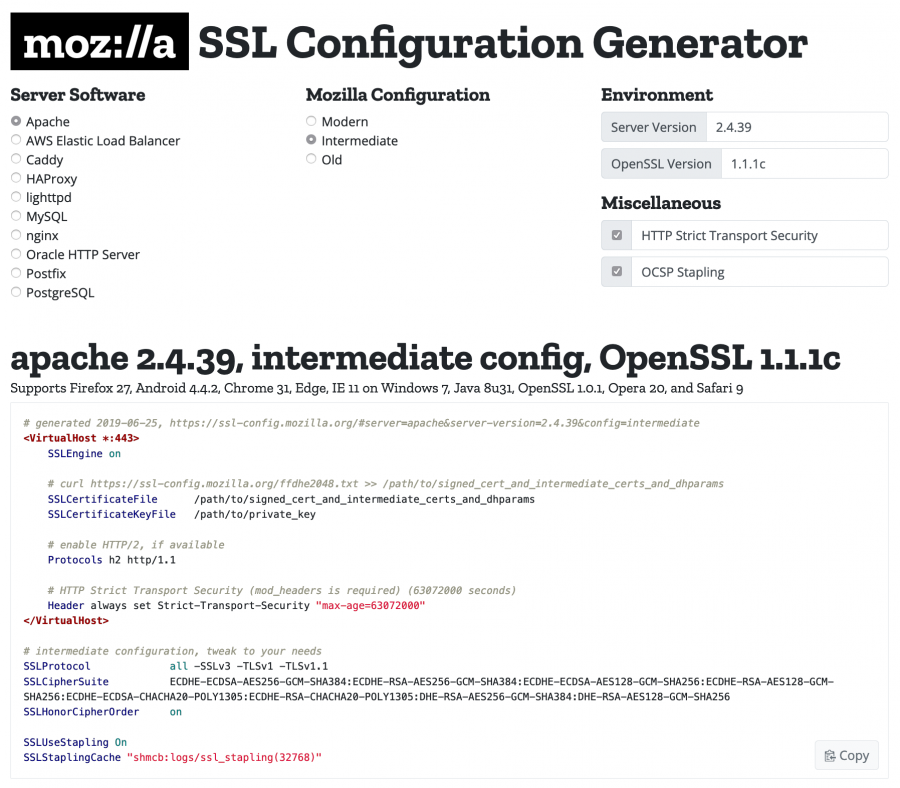
There is a Mozilla websites that maintains a reference guide for navigating the TLS landscape, as well as a configuration generator to assist system administrators.

Mozilla maintains three (3) recommended confiruations for servers using TLS.

  • Modern - modern clients that support TLS 1.3, with no need for backwards compatibility
  • Intermediate - recommended confiruation for a general-purpose server
  • Old - services accessed by very old clients or libraries, such as Internet Explorer 8 (windows XP), Java 6, or Open SSL 0.9.8


Mozilla SSL Configuration Generator

Links:


Jun 4, 2022

DevSecOps 101

This is 4 parts tutorial on DevSecOps 101.

In part 1, we will learn how to detect and avoid vulnerable dependencies when developing applications.In the first step of DevSecOps, the first step towards building more secure apps is detecting and avoid using dependencies that have known vulnerabilities. This process is called Software Component Analysis or SCA. 

There are a few commercial options like Snyk, but for this tutorial, we will use the open-source pip package safety.

$ pip install safety

$ safety check --full-report

The 2nd step is to integrate SCA into the CI/CD process by adding GitHub workflow to our repository.

Next, we will perform analysis on the source code to find security vulnerabilities. This process is known as Static Application Security Testing, and this has been part of the enterprise software development lifecycle (SDLC) for years.

Recently, there are opensource tools like pylint, eslint or semgrep.

semgrep is, as its names suggest, like grep, but for source code. It allows developers to automatically find patterns in their source code while taking into account semantics like variable renaming. You can find an example of semgrep finding XSS in Django code here.

Even better, semgrep supports a lot of languages, and the semgrep community already has written plenty of rulesets to detect bad practices and security flaws for those.

$ pip install semgrep

$ semgrep --config "p/ci" --exclude .venv --error

  •     --config "p/ci" means "use the community-written security rules for running in a ci environment"
  •     --exclude .venv means "do not search for vulnerable source code in the .venv folder" (otherwise it would return hundreds of alerts!)
  •     --error means return a non-zero error code if alerts are found. Useful for making the CI fail if insecure patterns are detected

Next, we need to add semgrep to the CI/CD to avoid ever doing the in the future. With this, we just installed a tool that scans all our python code to find insecure patterns, gives us recommendations on how to solve them, and integrates seamlessly into our CI/CD.

In part 3, we will be moving into Security Integration Testing (SIT) with automation.

To have an additional layer of security testing that is closer to the application's production context, security teams use specialized tools that will simulate attacks against the running application and report the successful ones.

This process is called Dynamic Application Security Testing (DAST).

Nuclei is an easy-to-use application security testing tool written in go-lang. It leverages the community to create new automated tests using simple YAML template files.  

$ go install -v github.com/projectdiscovery/nuclei/v2/cmd/nuclei@latest

$ docker-compose up

$ nuclei -u http://localhost:8080

Next, we will be integrating Nuclei inside the CI/CD process. Again,, in only a few steps, we just install a tool that scans for vulnerabilitites directly inside CI/CD. We scannd our live running app using nuclei web-app security scanner.

In part 4, we will be learning how to scan Docker images using Trivy. This is an opensource security scanner to find mis-configuration and vulnerabilities.

Thanks to trivy, one can scan its docker images to know literally in seconds if they contain packages with known vulnerabilities. Even cooler, trivy is free, open-source, and well maintained.

$  curl -sfL https://raw.githubusercontent.com/aquasecurity/trivy/main/contrib/install.sh | sh -s -- -b /usr/local/bin v0.21.0

$ docker build . --file Dockerfile.app -t dvpwa.app

$ trivy image dvpwa.app:latest

Lastly, we will be integrating trivy in GitHub Actions by following a template from AquaSec. So we just set up a tool that automatically detects vulnerable packages inside our docker images, directly in the CI/CD.

In fact trivy can scan way more than docker images: filesystems, requirements.txt, package.json, Dockerfiles and K8s configs.

$ trivy config .

This will scan Dockerfile.app and Docker.db automatic.


Links:

Nov 7, 2021

Assess Cloud Misconfiguration with CheckOV.io

Checkov is a static code analysis tool for infrastructure-as-code.

It scans cloud infrastructure provisioned using Terraform, Cloudformation, Kubernetes, Dockerfile and detects security and compliance misconfigurations using graph-based scanning.

Checkov is written in Python and provides a siple method to write and manage policies. It follows the CIS Foundations benchmarks where applicable.

Features

  • Over 1000 built-in policies cover security and compliance best practices for AWS, Azure and Google Cloud.
  • Scans Terraform, Terraform Plan, CloudFormation, Kubernetes, Dockerfile, Serverless framework and ARM template files.
  • Supports Context-awareness policies based on in-memory graph-based scanning.
  • Supports Python format for attribute policies and YAML format for both attribute and composite policies.
  • Detects AWS credentials in EC2 Userdata, Lambda environment variables and Terraform providers.
  • Identifies secrets using regular expressions, keywords, and entropy based detection.
  • Evaluates Terraform Provider settings to regulate the creation, management, and updates of IaaS, PaaS or SaaS managed through Terraform.
  • Policies support evaluation of variables to their optional default value.
  • Supports in-line suppression of accepted risks or false-positives to reduce recurring scan failures. Also supports global skip from using CLI.
  • Output currently available as CLI, CycloneDX, JSON, JUnit XML and github markdown and link to remediation guides.

Checkov supports developers using Terraform, Terraform plan, CloudFormation, Kubernetes, ARM Templates, Serverless, Helm, and AWS CDK.

Links:

  • https://securityonline.info/checkov-prevent-cloud-misconfigurations-during-build-time-for-terraform-cloudformation-kubernetes/
  • https://github.com/bridgecrewio/checkov