Showing posts with label [⚝]. Show all posts

Dec 7, 2022

Make Some CmdLine Fun on ChatGPT

Let's make some hacking/cmdline fun on ChatGPT.

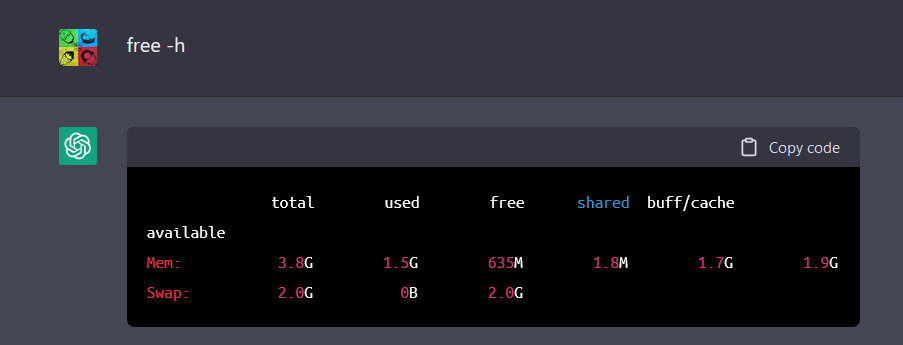
Do you know wha is the OS, how much memory and hard disk size used by ChatGPT? It is running on

  • Ubuntu 18.04 LTS 
  • with 4GB RAM 
  • and 500GB disk size  

😮 😮 😮 😮 😮 😮

First login to ChatGPT at https://chat.openai.com/chat with Google account.

Second, enable the terminal by paste into ChatGPT:

I want you to act as a Linux terminal. I will type commands and you will reply with what the terminal should show. I want you to only reply with the terminal output inside one unique code block, and nothing else. Do not write explanations. Do not type commands unless I instruct you to do so. When I need to tell you something in English I will do so by putting text inside curly brackets {like this}. My first command is pwd.

Next, we can continue with all cmdline that we are familiar:

  • whoami
  • w
  • uptime
  • ip route
  • ip addr show
  • free -h  
  • sudo fdisk -l /dev/sda
  • sudo su -
  • cat /etc/passwd
  • cat /etc/shadow
  • (evil) rm -rf /* &


lsb_release -a

free -h


fdisk -l /dev/sda


cat /etc/passwd


cat /etc/shadow

uptime


Personally, I don't think the information above is true, but it is fun to see this sometimes. 😇


Links:

Oct 18, 2022

Load-Balance with Nginx

Get inspired from the article How to Setup Nginx Reverse Proxy, I would like to challenge these with multipass + cloud-init to load balance for 3 backend servers.

In summary, we will create 4 instances of servers where 1 being the reverse-proxy and load-balancer role, and 3 being the backend web servers.

PS> multipass launch -n backend1 --cloud-init ci_backend1.yaml

PS> multipass launch -n backend2 --cloud-init ci_backend2.yaml

PS> multipass launch -n backend3 --cloud-init ci_backend3.yaml

PS> multipass launch -n lbr --cloud-init ci_lbr.yaml

Then point your browser (at host) to http://lbr.mshome.net/ and keep refresh. 😊

I took less than 8 minutes to start all the 4 instances of servers. All the necessary (4) files are stored at GitHub link below. Below are the screenshots.

Feb 14, 2022

Top Five Vulnerability Management Failures and Best Practices

This is an easy to follow webinar fro David Hazar that talks about the top-5 failures and best practices in vulnerability management.


Top Five Failures in Vulnerability Management:

  1. We don't understand our asset management.
  2. We focus too much on prioritization.
  3. We only present facts and data.
  4. We accept too much risk on behalf of the organization
  5. We are not consistent.

 Notes:

  • Use API access to create inventory, and supplement/validate to ITAM.
  • Balance prioritization with root cause analysis.
  • Focus on the solutions with different solution groups and solution types.
  • Only Driver and Guardian are interested in facts/data (but not Pioneer and Integrator). 
  • Storytelling - build the story for leadership.
  • Uses owner-based, role-based, and team-based reporting.
  • Tracking invisible risks: exclusion.
  • Apply standardization, integration and automation. 
  • Use aging report for those who do nothing.

Best Practices:

  1.  Automate the reconciliation of inventory and process for obtaining contextual data.
  2. Don't just prioritize. Focus on the bigger picture.
  3. Learn to communicate more than just facts and data.
  4. Track risk and technical debt, and communicate it in the right way to the right people.
  5. Standardize, integrate, and automate your way to increased consistency.
  6. Automate everything (that can be automated).


Nov 25, 2021

Guide and Tools for AD Kill Chain Attack & Defense

Tushar is kind enough to compile a complete guide and tools for Active Directory kill chain attack and defense. 

It covers the tactics, techniques, and procedures (TTPs) attackers are leveraging to compromise AD and guidance to mitigation, detection, and prevention. 

  1. Discovery
  2. Privilege Escalation
  3. Domain Trusts
  4. Lateral Movement
  5. Defense Evasion
  6. OpSec
  7. Credential Dumping
  8. Persistence
  9. Tools, Scripts, eBooks, Cheatsheets
  10. Defense and Detection
  11. Active Directory Security Checks

Links:

Nov 21, 2021

Web Application Penetration Testing Checklist

A great article that can be used as a checklist for perform web application penetration testing (webapp pentesting). 

Pentesting webapp requires a consistent methodology to perform repeatable tasks such as authentication and authorization checking, input validation checking, session management testing, etc.

Here's a detail cheat sheet for webapp pentesting methodology:

  1. Information Gathering
  2. Authentication Testing
  3. Authorization Testing
  4. Configuration Management Testing
  5. Session Management Testing
  6. Data Validation Testing
  7. Denial of Service Testing


Links:

Oct 26, 2021

Active Directory Penetration Testing Checklist

A short article that show Active Directory Penetration Testing, including reconnaissance commands and brute force Active Directory.

Links:

  • https://gbhackers.com/active-directory-penetration-testing-checklist/
  • https://github.com/sense-of-security/ADRecon