Showing posts with label SSL/TLS. Show all posts

Sep 7, 2022

Common Attacks on SSL/TLS

The SSL/TLS protocols are frequently attacked. And understanding past attacks can inform your knowledge as a defender and help you secure current systems. 

So here's a summary of the common attacks targeting these SSL/TLS from Megan Kaczanowski

Below are my notes about the attacks on  BEAST/Heartbleed/Poodle.


Browser Exploit Against SSL/TLS (BEAST)/2011

  • MitM attack that impacted SSL 3.0 and TLS 1.0
  • Depends on block ciphers (CBC mode) used by TLS.
  • Vulnerable to chosen plantext attack.
  • BEAST - exploit for CVE-2011-3389


Heartbleed/2012/2014

  • Vulnerability found in the heartbeat extension of OpenSSL library.
  • Cause leakage of data in unencrypted format including sensitive credentials, documents.
  • OpenSSL (the vulnerable versions were between 1.0.1 and 1.0.1f)
  • Doesn't leave any abnormal traces in logs.


Padding Oracle On Downgraded Legacy Encryption (POODLE)/2014

  • Flaw in SSL 3.0.
  • This attack does require a separate attack to gain this access and MiTM.
  • Essentially the message is hashed before sending and at the receiving end, and the re-compiled hash is compared to ensure message integrity, but the padding is not included.
  • Practically it is impossible to brute force SSL with this this attack and allows for recovering each byte after a maximum of 256 attempts per byte. That means an attacker could compromise a session cookie or other sensitive information in a few minutes.


 Attack and Mitigation

Attack Vulnerability Mitigation
BEASTCVE-2011-3389Upgrade to TLS 1.1 and above
HeartbleedCVE-2014-0160Upgrade OpenSSL (avoid between 1.0.1 and 1.0.1f)
POODLECVE-2014-3566Disable SSL 3.0


Links:

Aug 4, 2022

Encryption for SSH and TLS

Two most common cryptography protocols: SSH and TLS/SSL, are commonly mis-configured in many ways.


SSH (22/tcp)

The SSH key exchange algorithm is fundamental to keep the protocol secure. It is what allows two previously unknown parties to generate a shared key in plain sight, and have that secret remain private to the client and server.

Nearly all encryption schemes require parties to have a shared secret. Key Exchange algorithms are what allow two parties to create a shared secret while exchanging information in public sight. Key Exchange algorithms do not actually exchange keys, but rather partial variables that allows both parties to create a shared secret.

Over time, some implementations of this algorithm have been identified as weak or vulnerable.

A weak Key Exchange Algorithms use components with fundamental security flaws. There are only two primary reasons they are be regarded as ‘weak’:

  1. The algorithm uses SHA1. 
  2. The algorithm uses RSA 1024-bit modulus keys.

When flaws were identified in SHA1, it was believed this could potentially impact SSH security. An attack against the protocol would carry an extreme level of difficulty and would be nearly impossible to conduct in practice.

Despite the unlikeliness of an attack occurring, using encryption algorithms with known weaknesses such as SHA1 will raise a Low Risk issue on a network penetration test.

A list of known weak key exchange algorithms:

  • diffie-hellman-group-exchange-sha1
  • Diffie-hellman-group1-sha1
  • gss-gex-sha1-*
  • gss-group1-sha1-*
  • rsa1024-sha1

Besides that, there is also issue of SSH weak MAC algorithms. These algorithms exist in the majority of SSH configurations and are generally considered Low Risk.

As with most encryption schemes, SSH MAC algorithms are used to validate data integrity and authenticity. A ‘MAC algorithm’ should not be conflated with a MAC (Message Authentication Code) as these are two distinct components. The MAC algorithm uses a message and private key to generate the fixed length MAC.

A weak MAC algorithm may be considered weak for the following reasons:    

  1. A known weak hashing function is used (MD5) 
  2. The digest length is too small (Less than 128 bits) 
  3. The tag size is too small (Less than 128 bits) 

The following are the most common known weak MAC algorithms encountered in SSH:    

  • hmac-md5
  • hmac-md5-96
  • hmac-sha1-96
  • hmac-sha2-256-96
  • hmac-sha2-512-96


TLS/SSL (443/tcp)

3 commonly mis-configured ciphers in TLS/SSL server:

  • Information disclosure with predicted IV in CBC
  • NULL ciphers supported
  • 'Export Ciphers' enabled  

SSLv3 and TLS1.0 implementations using Chained-block ciphers (CBC) may be vulnerable to plain-text recovery attacks. When predictable IVs are used in CBC mode, an attacker can leverage this in more advanced attacks as demonstrated in the ‘BEAST’ attack.

There are two ways to remediate this: 1) Disable TLS 1.0 completely to enforce TLS 1.1 and TLS 1.2; 2) Leave TLS 1.0 support enabled, but disable Chained Block Ciphers (CBC).

NULL ciphers offer no true cryptographic data confidentiality. Instead of secure mathematical algorithms to protect data, null ciphers use predefined blocks of data to obfuscate plain-text. No protection is actually provided by null ciphers and should not be used in production environments where confidentiality is required.

Examples of null ciphers:

  • TLS_NULL_WITH_NULL_NULL
  • TLS_RSA_WITH_NULL_MD5 / NULL-MD5
  • TLS_DHE_PSK_WITH_NULL_SHA / DHE-PSK-NULL-SHA

Export ciphers’ are low-grade cryptographic ciphers that were authorized to be used outside the US during the 1990’s. During this time encryption was heavily regulated by the US government as auxiliary military equipment. This allowed intelligence agencies greater ease to eavesdrop on foreign communication channels of interest.

Although export ciphers may be strong enough to secure data from the general public, they include many well known flaws that would allow state-sponsored actors to break the encryption if intercepted. Supporting export ciphers poses an excessive risk to users who may be using older web clients.

Because most SSL/TLS services negotiate ciphers in a top-down fashion, it is rare that clients such as web browsers will negotiate all the way to down to export grade encryption. Despite this, consideration should be given to downgrade attacks where negotiation of export ciphers may be forced by a MITM vector. 

Examples of 'export ciphers':

  • SSL_RSA_EXPORT_WITH_RC4_40_MD5 / EXP-RC4-MD5
  • TLS_RSA_EXPORT_WITH_DES40_CBC_SHA / EXP-DES-CBC-SHA


Links:


Aug 3, 2022

SSH and TLS Enumeration

SSH and TLS/SSL are the two (2) most common encrypted protocols used daily by sysadm. Here, I listed some cmdline commonly used by me daily in troubleshooting the 2 protocols and some links below.


SSH (22/tcp):

Enumerate SSHD configuration with SSHscan

$ python sshscan.py -t 192.168.31.1

Enumerate SSH algorithm with NMAP

$ nmap --script ssh2-enum-algos 192.168.1.1

Print its (client) configuration after evaluating Host and Match blocks.

$ ssh -G 192.168.31.1

Queries ssh for the algorithms supported: cipher, cipher-auth, mac, kex, keq-gss, key, key-cert, key-plain, key-sig, protocol-version.

$ ssh -Q query_option


TLS/SSL (443/tcp):

$ sslyze www.facebook.com

$ ./sslscan.exe 192.168.31.1

$ tlsscan 192.168.31.1

$ ./tls-scan -c www.facebook.com --cacert=./ca-bundle.crt --pretty


Links:


Jul 7, 2022

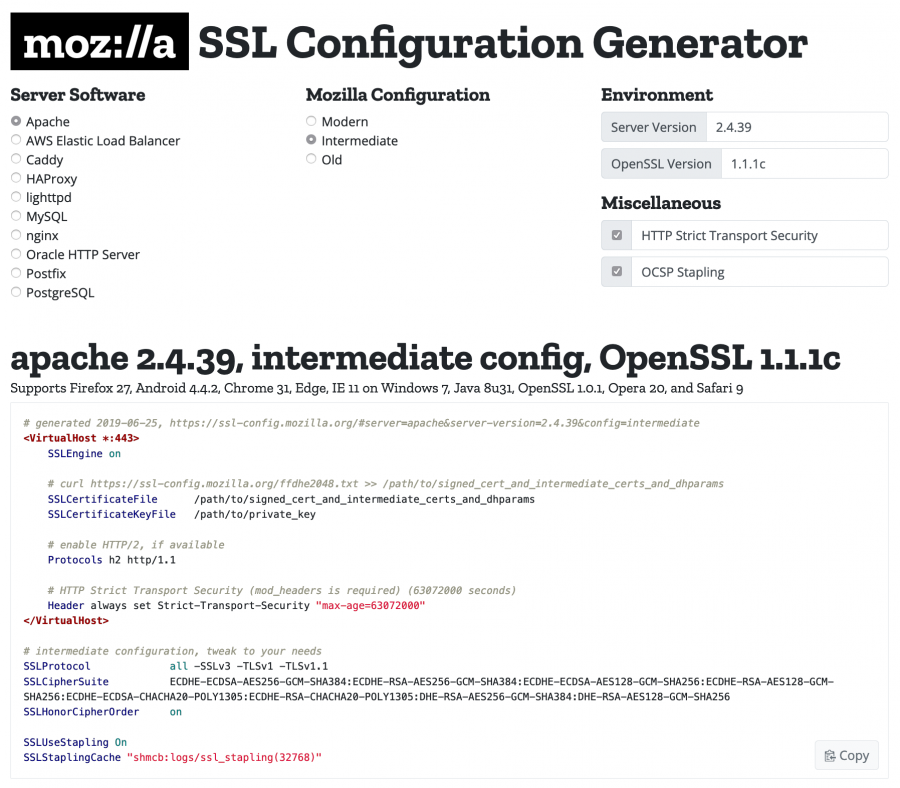
SSL Configuration Generator

There is a Mozilla websites that maintains a reference guide for navigating the TLS landscape, as well as a configuration generator to assist system administrators.

Mozilla maintains three (3) recommended confiruations for servers using TLS.

  • Modern - modern clients that support TLS 1.3, with no need for backwards compatibility
  • Intermediate - recommended confiruation for a general-purpose server
  • Old - services accessed by very old clients or libraries, such as Internet Explorer 8 (windows XP), Java 6, or Open SSL 0.9.8


Mozilla SSL Configuration Generator

Links:


Jul 6, 2022

SSLyze – Fast and powerful SSL/TLS scanning tool

SSLyze tool is an automated cyber security tool that is used to scan the target domain for SSL/TLS vulnerabilities like Heartbleed, OpenSSL, and many more. This tool is developed in the Python language and is also available on the GitHub platform.


Installation:

$ cd repo

$ git clone https://github.com/nabla-c0d3/sslyze.git

$ cd sslyze

$ sudo python3 setup.py install

$ sslyze -h

$ sslyze www.geeksforgeeks.org


Links:

Jul 2, 2022

SSl/TLS Recon

sslscan2 

  • support legacy protocols, SSLv2 and SSLv3, as well as TLSv1.3
  • no longer reliant on OpenSSL.
  • enumerate server key exchange groups.
  • enumerate server signature algorithms.
  • can use docker.

tlsscan

  • TLS/SSL protocol scanner
  • support newer protocols and ciphers scan via upstream OpenSSL project.

tls-scan

  • single threaded asynchronous/event-based program.
  • track/test/debug certificate and TLS configuration.
  • Scan for TLS-based server, collect X.509 certs and ciphers.
  • Support TLS and StartTLS protocols.
  • produces output in JSON.


Links:


Mar 26, 2021

Two OpenSSL Vulnerabilities for this week

After the busy week with PoC, DoS is coming. 

Two critical OpenSSL vulnerabilities released yesterday and I just see them in my mailbox.

In CVE-2021-3449, a denial-of-service condition exists in the default renegotiation configuration of TLSv1.2, can be triggered by malicious ClientHello requests. This means all the internet-facing systems are potentially be targeted with this hard-to-detect (but easy to assess) application level attack. This attack can be triggered by NULL pointer de-reference if renegotiation is enabled (in TLSv1.2 only), and can be assessed with SSLScan:

CVE-2021-2449

In CVE-2021-2450, a high severity vulnerability, is a CA certificate check bypass issue where the "valid CA certificate check result" can be overwritten. In another word the "check that ensuring non-CA certificates must not be able to issue other certificates" can be bypassed.

This is a new feature introduced since 1.1.1h, and thus only affecting this version. Upgrade to 1.1.1k version to fix the issue, and run the following command to check the version:

$ openssl version -a

Links:

  • https://attackerkb.com/topics/DMtqBir1bn/openssl-tls-server-crash-null-pointer-dereference-cve-2021-3449#rapid7-analysis
  • https://attackerkb.com/topics/3R2Ftv4qHX/cve-2021-3450#rapid7-analysis
  • https://www.openssl.org/news/secadv/20210325.txt

Jan 18, 2020

Essential OpenSSL Commands

Here, I collected some essential commands for OpenSSL.


Check the Connection:

$ openssl s_client -showcerts -connect www.microsoft.com:443


Decoding BASE64 (PEM) Certificate

Capture the output between “—–BEGIN CERTIFICATE—–” and “—–END CERTIFICATE—–” tags, and save as a text file (i.e. cert_microsoft.com).

Run the command below to read the file, and display it in a textual format.

$ openssl x509 -noout -text -in cert_microsoft.com


Decoding Binary Certificate (DER) Certificate

DER is a binary certificate format and the content is the same as PEM (Base64).

$ openssl x509 -noout -text -inform der -in cert_microsoft.der


Convert Certificate between DER and PEM format

By the way, -inform is short for “input format”

$ openssl x509 -inform der -in cert_microsoft.der -out cert_microsoft.pem

$ openssl x509 -inform der -in cert_mirosoft.der -outform pem -out cert_microsoft.pem

$ openssl x509 -in cert_microsoft.pem -outform der -out cert_microsoft.der

 $ openssl x509 -inform pem -in cert_microsoft.pem -outform der -out cert_microsoft.der


Checking the Chain of Trust

$ openssl verify -verbose cert_microsoft.pem

If you see "Error 20 at 0 depth lookup", it means that the intermediate certificate (or certificate for the Issuer of the server certificate) is missing. 

$ openssl verify -untrusted cert_symantec cert_microsoft.pem

If you see "Error 20 at 1 depth lookup", it means the error is no longer on the server certificate (0 depth) but now can't find the issuer certificate for the Symantec cert.

$ openssl verify -untrusted cert_symantec -CAfile ./RootCerts.pem cert_microsoft.pem

You should see everything is "OK" now.

If you have more than 1 intermediate certificate, just concatenate both certs into one.

$ cat inter1.pem inter2.pem > inter_both.pem


Testing SSLv2/SSLv3/TLSv1/TLSv1.1/TLSv1.2/TLSv1.3

$ openssl s_client -ssl2 -connect microsoft.com:443

$ openssl s_client -ssl3 -connect microsoft.com:443

$ openssl s_client -tls1 -connect microsoft.com:443

$ openssl s_client -tls1_1 -connect microsoft.com:443

$ openssl s_client -tls1_2 -connect microsoft.com:443

$ openssl s_client -tls1_3 -connect microsoft.com:443    

$ openssl s_client [-no_ssl3, -no_tls1, -no_tls1_1, -no_tls1_2, -no_tls1_3] -connect microsoft.com:443


Get the Common Name (cn) or Subject

$ openssl x509 -noout -subject -in cert_microsoft.pem


Renegotiation (by client)

$ openssl s_client -connect www.microsoft.com:443

HEAD / HTTP/1.0

R

<CRLF>


Testing Weak Ciphers

$ openssl s_client -cipher NULL,EXPORT,LOW,3DES -connect <site:port>


Testing NULL Cipher

$ openssl s_client -cipher aNULL -connect <site:port>


Forward Secrecy

$ openssl s_client -cipher EDH,EECDH -connect <site:port>


Testing RC4 ciphers

$ openssl s_client -cipher RC4 -connect <site:port>


Testing Compression (CRIME/TLS or BREACH/HTTP)

"Compression: zlib compression" and "Compression: 1 (zlib compression)" indicate that the remote server is vulnerable to the CRIME attack. "Compression: NONE" means not vulnerable to TLS compression. 

$ openssl s_client -connect <site:port>

GET / HTTP/1.1
Host: example.com
Accept-Encoding: compress, gzip
<CRLF><CRLF> 

If the response contains encoded data, it indicates that HTTP compression is supported; therefore the remote host is vulnerable (to BREACH).


Links:
Apr 5, 2011

Network Forensic Analysis of SSL MITM Attacks

SSL is not a panacea. If someone performs a man-in-the-middle (MITM) attack on HTTPS traffic (i.e. HTTP over SSL), he would be able to see all encrypted content in clear text format.

There are some legitimate reasons to eavesdrop the HTTPS traffic, such as your employer or your government.

If you suspect your network traffic is been monitor, how would you go about doing forensic analysis of captured network traffic from a suspected MITM attack?

Here's the summary of the articles that shows you how:


  • Extract the X.509 certificates (with *.cer) from the captured SSL traffic with NetworkMiner.
  • Inspect the extracted files.
  • Verify the IP and DNS
  • Look for any self-signed cert, revoked cert and non-trusted CA signing cert.
  • Verify MD5 fingerprint of an SSL cert with OpenSSL

$ openssl x509 -inform DER -in mail.google.com.cer -noout -fingerprint -md5
MD5 Fingerprint=52:12:A2:B1:27:E3:BB:CC:E5:F5:AA:BD:A1:A1:E6:F8

More references:


Aug 3, 2010

The Cost of Switching to SSL

We can access to Gmail using HTTPS for a long time. Recently, Google has added full SSL service to Gmail and has made some decisive changes to its services. We have seen a redesigned Search, a redesigned YouTube, Google News, changes in Google Apps and the the addition of an Encrypted Search for enhanced security using SSL/TLS.

Most websites do not provide it because it is expected to be something of a high standard and is believed to require powerful servers. On the contrary, the truth is that HTTPS is not at all as resource intensive on the server as it is believed to be.

A Chrome Engineer at Google, Adam Langley writes at the Imperial Violet stating,
all of our users use HTTPS to secure their email between their browsers and Google, all the time. In order to do this we had to deploy no additional machines and no special hardware. On our production frontend machines, SSL/TLS accounts for less than 1% of the CPU load, less than 10KB of memory per connection and less than 2% of network overhead. Many people believe that SSL takes a lot of CPU time and we hope the above numbers (public for the first time) will help to dispel that.
However, the downside with SSL is that it includes a considerable latency in connection. This research reveals that there is a latency of 3.5x on SSL handshakes, the method of initializing a connection to  server. Basically, using SSL connections slows down connection establishment to a server. So did Google just compromise speed for security? Definitely not.

Google is using several mechanisms to reduce this latency. See this excerpt from the post at Langley’s blog.

OpenSSL tends to allocate about 50KB of memory for each connection. We have patched OpenSSL to reduce this to about 5KB.

Moreover Google also caches most HTTPS requests which allows it to serve them faster in subsequent queries. Google claims that this resume behavior takes place 50% of the time. SSL has been optimized at its best at Google.

These facts prove that SSL is not as resource intensive as it is blamed to be. The fact of it being more expensive is just a commercial aspect and a business policy.

Aug 27, 2009

Crypto Attacks: It’s the implementation stupid

This is a great write up on analyzing the Moxie Marlinspike’s latest sslstrip tool (introduced in BH09). The tool does exploit a vulnerability in most of the current browser that could break SSL connection.

The root cause of this vulnerability is at:
This vulnerability relies on the fact that character strings within X.509 certificates are ASN.1 encoded, but software written in the C programming language typically manipulates character strings as null terminated character arrays. ASN.1 strings are stored using a form of Type-Length-Value (TLV) encoding. C strings are simply terminated by a null byte (\x00).

Enjoy the article here!

Jul 31, 2009

Breaking SSL with NULL Character


Another interesting post about what's happening at Las Vegas BlackHat event now, SSL.

Moxie Marlinspike and Dan Kaminsky had independently found a problem in most implementations that enables an attacker to create certificates that appear valid for any web site. By cleverly embedding NULL characters to the certificate name field, a browser will incorrectly match a malicious certificate to a valid web site.

Early this year, we see how sslstrip hijacking SSL at BlackHat DC. This time, both the experts make the attack even more effective. See here:
You (evil admin) apply for a certificate. The certificate authority (CA) looks at the common name (CN) on the form and contacts the domain owner. The CA ignores the subdomain.

The trick is to drop in a [NULL] character in the subdomain, such as www.paypal.com[NULL].eviladm.org, the CA will contact the owner of eviladm.org and issue the cert.

When clients use browser to verify the cert, the null character causes them to think the certficate is valid for www.paypal.com because they stop at the null character. Even if the client examines the cert in their browser, it will show www.paypal.com. wildcards work as well. you could get a certificate for *[NULL].eviladm.org and appear as any site you want.
Moxie has released his new code soon, to be part of sslsniff 0.6.

Apr 9, 2009

SSL Audit

SSL is not a panacea. Thus, it is important to learn how to audit a SSL/TLS host effectively. This is a compilation of various articles on how to audit a weak SSL host.

Attempt to connect to target (in this case google.com) with SSLv2:
~# openssl s_client -no_tls1 -no_ssl3 -connect www.google.com:443
Check the output if it works. You can also do this with NMAP (with NSE script):
~# nmap -n -p443 -v --script=sslv2 -iL target.list -oG https.gnmap
Next, we will need to parse the NMAP output and dump the all the X.509 certificates with OpenSSL tool:
~# gawk "/https/{print $0}" https.gnmap > https-ip.txt
~# ./get-cert-info.sh https-ip.txt
Below is the "get-cert-info.sh":
#!/bin/bash
# You will need OpenSSL for this script to work

processLine(){
# Use OpenSSl to download the cert and extract the right info
# from it witht he X509 utility e.o.
line="$@" # get all args
IP=$(echo "$line" | cut -d" " -f1)
TARGETDOM=$(echo "$line" | cut -d" " -f2)
HOST="$TARGETDOM:443"
# Connect to HOST, defer errors to /dev/null,
# send standard output to RAWCERT variable
RAWCERT=$(openssl s_client -connect ${HOST} 2>/dev/null)
# Obtain encoded certificate from RAWCERT
CERTTEXT=$(echo "$RAWCERT" | /
sed -ne '/-BEGIN CERTIFICATE-/,/-END CERTIFICATE-/p')
# Process certificate for the different variables
SIGALG=$(echo "$CERTTEXT" | /
openssl x509 -noout -text | /
grep -m 1 "Signature Algo" | cut -d: -f2)
SUBJECT=$(echo "$CERTTEXT" | /
openssl x509 -noout -subject | sed -e 's/subject= //')
ISSUER=$(echo "$CERTTEXT" | /
openssl x509 -noout -issuer | sed -e 's/issuer= //')
START=$(echo "$CERTTEXT" | /
openssl x509 -noout -startdate | cut -d= -f2)
END=$(echo "$CERTTEXT" | /
openssl x509 -noout -enddate | cut -d= -f2)
SERIAL=$(echo "$CERTTEXT" | /
openssl x509 -noout -serial | cut -d= -f2)

#Clean-up dates
START=$(echo "$START" | sed -e 's/GMT//')
START=$(echo "$START" | cut -d" " -f1,2,4)
STARTDAY=$(echo "$START" | cut -d" " -f2)
STARTMONTH=$(echo "$START" | cut -d" " -f1)
STARTYEAR=$(echo "$START" | cut -d" " -f3)
START=$STARTDAY\/$STARTMONTH\/$STARTYEAR

END=$(echo "$END" | sed -e 's/GMT//')
END=$(echo "$END" | cut -d" " -f1,2,4)
ENDDAY=$(echo "$END" | cut -d" " -f2)
ENDMONTH=$(echo "$END" | cut -d" " -f1)
ENDYEAR=$(echo "$END" | cut -d" " -f3)
END=$STARTDAY\/$STARTMONTH\/$STARTYEAR

# Output in CSV format
echo $IP, $TARGETDOM, $SIGALG, $SUBJECT,/
$ISSUER, $START, $END, $SERIAL
}

### File line loop ###
# Store file name
FILE=""

# Make sure we get file name as command line argument
FILE=${1?"No file name specified"}
# Check that file exists and is readable
[ ! -f $FILE ] && { echo "$FILE: does not exist"; exit 1; }
[ ! -r $FILE ] && { echo "$FILE: cannot be read"; exit 2; }

#Open file for reading
exec 3< $FILE

#Process file line by line
while read -u 3 line
do
# use $line variable to process line
# in processLine() function
processLine $line
done

# Close file after reading
exec 3<&-

exit 0

Related links: