Starting from 2023, this blog is moving to GitHub to continue on my personal web site and blog management.
Thank you Blogger.com This is a long journey 16 years. Let's continue on https://myseq.github.io/
Starting from 2023, this blog is moving to GitHub to continue on my personal web site and blog management.
Thank you Blogger.com This is a long journey 16 years. Let's continue on https://myseq.github.io/
Jekyll is one of the most popular generators for static websites and is based on Ruby. To realize the actual website, the generator uses CSS, HTML and Markdown. Jekyll also offers easy migration from WordPress or other systems to the new environment.
Here the steps I followed to setup Jekyll on Ubuntu.
Let's start with installing Ruby and prerequisites.
$ sudo apt install ruby-full build-essential zlib1g-dev
Then, setup the gem installation directory in the BASH startup.
$ echo '# Install Ruby Gems to ~/gems' >> ~/.bashrc
$ echo 'export GEM_HOME="$HOME/gems"' >> ~/.bashrc
$ echo 'export PATH="$HOME/gems/bin:$PATH"' >> ~/.bashrc
$ source ~/.bashrc
Next, install Jekyll and Bundler:
$ gem install jekyll bundler
Now, just clone from the GitHub with the theme Chirpy.
$ git clone https://github.com/cotes2020/jekyll-theme-chirpy
Last, install the dependencies and run local server.
$ cd jekyll-theme-chirpy
$ bundler
$ bundle exec jekyll serve --host 0.0.0.0
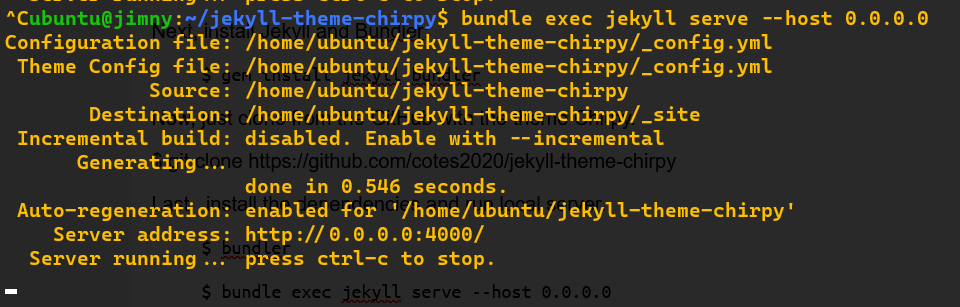 |
| http://0.0.0.0:4000/ |
Gitleaks is a SAST tool for detecting and preventing hardcoded secrets like passwords, api keys, and tokens in git repos
It is a fast, light-weight, portable, and open-source secret scanner for git repositories, files, and directories. With over 5 million docker downloads, 10k GitHub stars, and over 200k homebrew installs, gitleaks is the most trusted secret scanner among security professionals, enterprises, and developers.
Links:
SSLyze tool is an automated cyber security tool that is used to scan the target domain for SSL/TLS vulnerabilities like Heartbleed, OpenSSL, and many more. This tool is developed in the Python language and is also available on the GitHub platform.
Installation:
$ cd repo
$ git clone https://github.com/nabla-c0d3/sslyze.git
$ cd sslyze
$ sudo python3 setup.py install
$ sslyze -h
$ sslyze www.geeksforgeeks.org
Links:
sslscan2
tlsscan
tls-scan
Links:
An excellent write up, from Magno Logan, about the GitHub Actions (GHA), one of the commonly used CI tools today.
This article covers some security risks and best practices about using GHA as your primary CI tool.
About GitHub Actions (GHA)
GitHub Actions released in 2019. Working as CI tools, tt helps developers automate tasks within the software development life cycle (SDLC). One advantage of GHA is that developers do not need a separate CI tool but executes the workflow directly from GitHub.
Actions are formed by a set of components. These are the six main components of a GHA:
- Workflows: Automated procedure added to the repository, and is the actual Action itself
- Events: An activity that triggers a workflow; these can be based on events such as push or pull requests, but they can also be scheduled using the crontab syntax
- Jobs: A group of one or more steps that are executed inside a runner
- Steps: These are tasks from a job that can be used to run commands
- Actions: The standalone commands from the steps
- Runners: A server that has the GHA runner application installed
The full article contains many more information including:
 |
| GitHub Action Runners |
Links:
This is a simple note to show how to access GitHub Secrets with Python.
First, to add a new secret, go to GitHub repository > Settings > Secrets > New Repository Secret.
Second, define a Name ('SEC_NAME') and put in the Value.
Next, map them as environment variables in GitHub Actions Workflow.
....
- name: Run tests
env:
API_KEY: ${{ secrets.SEC_NAME }}
run: |
....
Finally, refer to the env variable in Python script.
import os
API_KEY = os.environ['API_KEY']
....
The cisa-alerts.py script has been renamed to kev-catalog.py and been published to GitHub today. Just download, setup and run the script.
$ git clone https://github.com/myseq/kev-catalog
$ cd kev-catalog/
$ pip3 install -r requirements.txt
$ python3 kev-catalog.py -v
 |
| kev-catalog.py |
Links:
Once upon a time, there was a Microsoft product called Team Foundation Server (TFS). The online version of TFS then became Visual Studio Online, which became Visual Studio Team Services, which is now Azure DevOps.
Microsoft bought Github in 2018, which is also a DevOps tool and shares a lot of the same features.

For the full details, read them at A Cloud Guru.
If you are looking for a quick and fun introduction to GitHub, you've found it. This class will get you started using GitHub in less than an hour.
None. This course is a great introduction for your first day on GitHub.
We'll answer common questions like:
And when you're done you'll be able to: